ip
Quick start
-
Ensure you have Java
11or above installed in your Computer. -
Download the latest
olaf.jarfrom here. -
Copy the file to the folder you want to use as the home folder for your Olaf app.
-
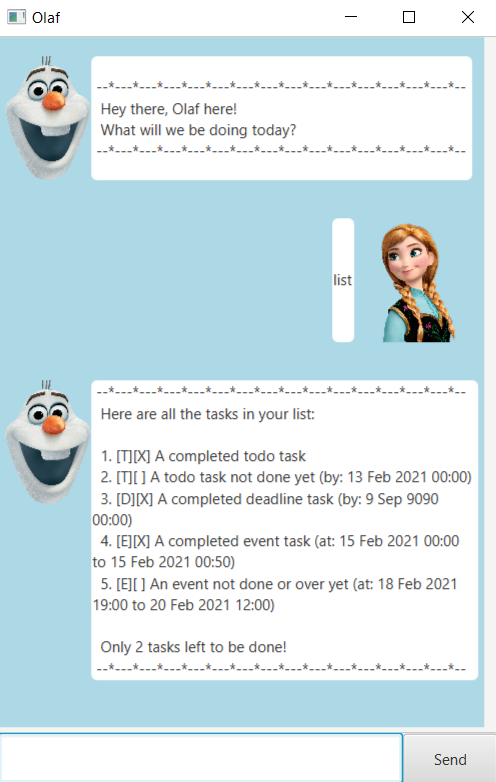
Double-click the file to start the app. The GUI with a greeting from Olaf, similar to the below should appear in a few seconds. Notice your app will not have any data in the task list unlike the example below.
-
Type the command in the command box below and press Enter to execute it. e.g. typing
helpand pressing Enter will give a response listing all the possible commands you can use.
Some example commands you can try:-
list: Lists all tasks in the current list. -
todohomework: Adds a todo Task with descriptionhomeworkto Olaf. -
delete3: Deletes the 3rd listed task shown in the current list. -
done3: Marks the 3rd Task in the current list as done. -
bye: Exits the app after showing a goodbye message.
-
-
Refer to the Features below for details of each command.
Notations
:information_source: Notes about the command format:
-
Words in
<UPPER CASE>are the parameters to be supplied by the user.
e.g. indone <TASK NUMBER>,<TASK NUMBER>is a parameter which can be used asdone 3. -
Items in square brackets are optional.
e.gfind <SEARCH TERM> [, <MORE SEARCH TERMS>]can be used asfind project, presentationor asfind project. -
Extraneous parameters for commands that do not take in parameters (such as
help,list,remindandbye) will NOT be ignored.
e.g. if the command specifieshelp 123, it will not be interpreted ashelp.
Command summary
| Action | Format, Examples |
|---|---|
| Help | help |
| List | list |
| Remind | remind |
| Todo | todo <TASK DESCRIPTION> |
| Deadline | deadline <TASK DESCRIPTION> /by <YYYY-MM-DD HH:mm> e.g., deadline project submission /by <2021-02-21 00:00> |
| Event | event <TASK DESCRIPTION> /at <YYYY-MM-DD HH:mm> to <YYYY-MM-DD HH:mm> e.g., event new year's eve /at <2021-12-31 00:00> to <2022-01-01 00:00> |
| Done | done <TASK NUMBER>e.g., done 2 |
| Delete | delete <TASK NUMBER>e.g., delete 3 |
| Find | find <SEARCH TERM> [, <MORE SEARCH TERMS>]e.g., find project, presentation |
Features
Viewing help : help
Shows summary of all commands.
Format: help
Listing all tasks : list
Shows a list of all tasks in the application.
Format: list
Get reminder : remind
Shows a list of all upcoming deadlines and events in the next 7 days.
Format: remind
Adding a todo: todo
Adds a todo Task to the application.
Format: todo <TASK DESCRIPTION>
- Description cannot be empty
Examples:
todo readingstodo clean room
Adding a deadline: deadline
Adds a deadline Task to the application.
Format: deadline <TASK DESCRIPTION> /by <YYYY-MM-DD HH:mm>
- Description cannot be empty
- Time is given in 24 hour format
- The deadline date and time has to be after current time
Examples:
deadline birthday /by 2021-06-21 00:00deadline project submission /by 2021-02-21 23:59
Adding an event: event
Adds an event Task to the application.
Format: event <TASK DESCRIPTION> /at <YYYY-MM-DD HH:mm> to <YYYY-MM-DD HH:mm>
- Description cannot be empty
- Time is given in 24 hour format
- The start date and time has to be before end date and time
- When loading existing event task from storage, it will be marked as done if the event is already over.
Examples:
event new year's eve /at 2021-12-31 00:00 to 2022-01-01 00:00event webinar /at 2021-02-20 13:00 to 2021-02-20 15:30
Completing a task : done
Marks the specified task in the current task list as done.
Format: done <TASK NUMBER>
- Marks the task with the specified
TASK NUMBERas completed. - The number refers to the index number shown in the displayed task list after the
listcommand. - The index must be a valid integer in the list 1, 2, 3, …
Examples:
done 1completes the 1st task in the task list returned after thelistcommand.find assignmentfollowed bydone 1does NOT complete the 1st task in the results of thefindcommand but rather completes the 1st task like in the previous example.
Deleting a task : delete
Deletes the specified task in the current task list.
Format: delete <TASK NUMBER>
- Deletes the task with the specified
TASK NUMBER. - The number refers to the index number shown in the displayed task list after the
listcommand. - The index must be a valid integer in the list 1, 2, 3, …
Examples:
delete 1deletes the 1st task in the task list returned after thelistcommand.find assignmentfollowed bydelete 1does NOT delete the 1st task in the results of thefindcommand but rather deletes the 1st task like in the previous example.
Locating tasks by name: find
Finds tasks whose names contain any of the given search terms.
Format: find <SEARCH TERM> [, <MORE SEARCH TERMS>]
- The search is case-insensitive. e.g
hanswill matchHans - The order of the keywords does not matter. e.g.
Hans, Bowill matchBo Hans - Only the name is searched.
- Partial words will be matched e.g.
prowill matchproject - Tasks matching at least one search term will be returned (i.e.
ORsearch). e.g.project, homeworkwill returnCS1010 Project,GER homework
Examples:
find subreturnssubmitandsubmissionfind webinar, lecturereturnsAI Webinar,Lecture presentation
Exiting the program : bye
Exits the program about 1 second after displaying a goodbye message.
Format: bye
Saving the data
Olaf tasks are saved in the hard disk automatically after any command that changes the data. There is no need to save manually.
Editing the data file
Olaf tasks are saved as a .txt file [JAR file location]/data/olaf.txt. Advanced users are welcome to update data directly by
editing that data file but please follow expected saving format to avoid application crashes.
Archiving data files [coming in v2.0]
Details coming soon …
md template adapted from: https://github.com/se-edu/addressbook-level3/blob/master/docs/UserGuide.md